---
title: WorldWindJava 学习笔记
date: 2021-09-02
author: ac
tags:
- WorldWindJava
categories:
- GIS
---
> `WorldwindJava`是`NASA`(美国国家航空航天局)开源的Java服务端的三维类库,一般用于客户端应用。

## [WorldWind](https://worldwind.arc.nasa.gov/)
### 1. 简介
WorldWind是一个开放源代码的虚拟地球仪API。WorldWind允许开发人员快速轻松地创建3D地球,地图和地理信息的交互式可视化。世界各地的组织都使用WorldWind监视天气模式,可视化城市和地形,跟踪车辆移动,分析地理空间数据并科普教育有关地球的知识。
WorldWind提供了[Web端](https://github.com/NASAWorldWind/WebWorldWind)(JavaScript)、[移动端](https://github.com/NASAWorldWind/WorldWindAndroid)(Android)、[服务端](https://github.com/NASAWorldWind/WorldWindJava)(Java)三个版本的开发库。
### 2. 环境搭建(Java)
本篇使用的是Java版本,所以安装好JDK,最新版本的WorldWindJava [v2.2.0](https://github.com/NASAWorldWind/WorldWindJava/releases/tag/v2.2.0)使用的是JDK11,但为了和项目兼容采用的是jdk8,所以WorldWindJava下载[v2.1.0](https://github.com/NASAWorldWind/WorldWindJava/releases/tag/v2.1.0)的版本。

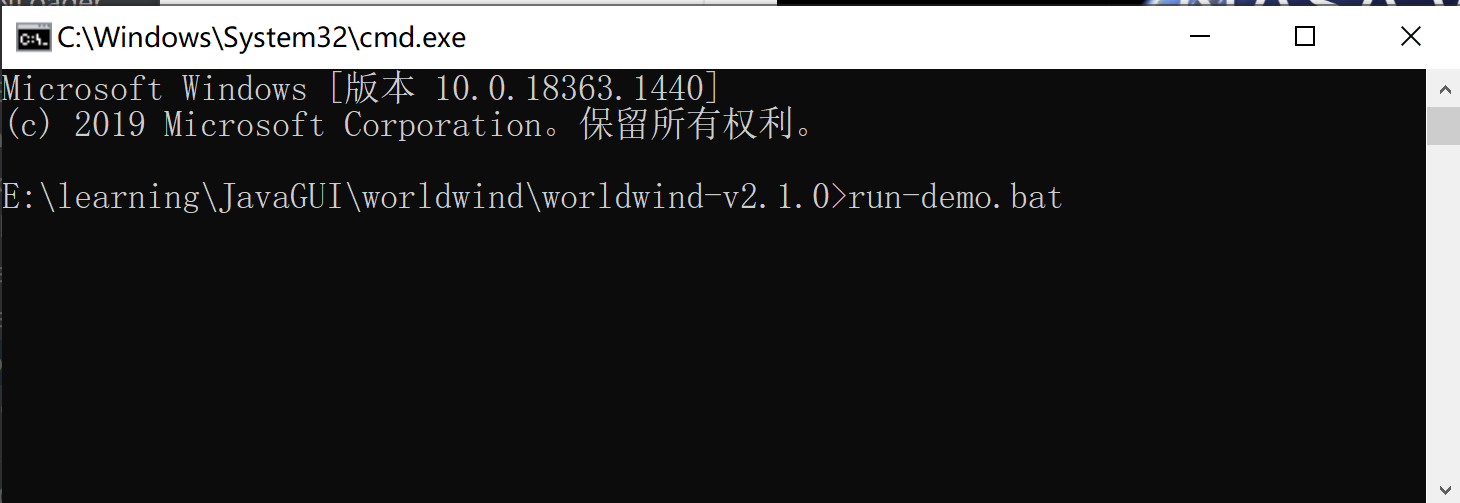
解压后在当前目录的命令行运行`run-demo.bat`命令,可以查看`World Wind Appliaction`程序窗口。
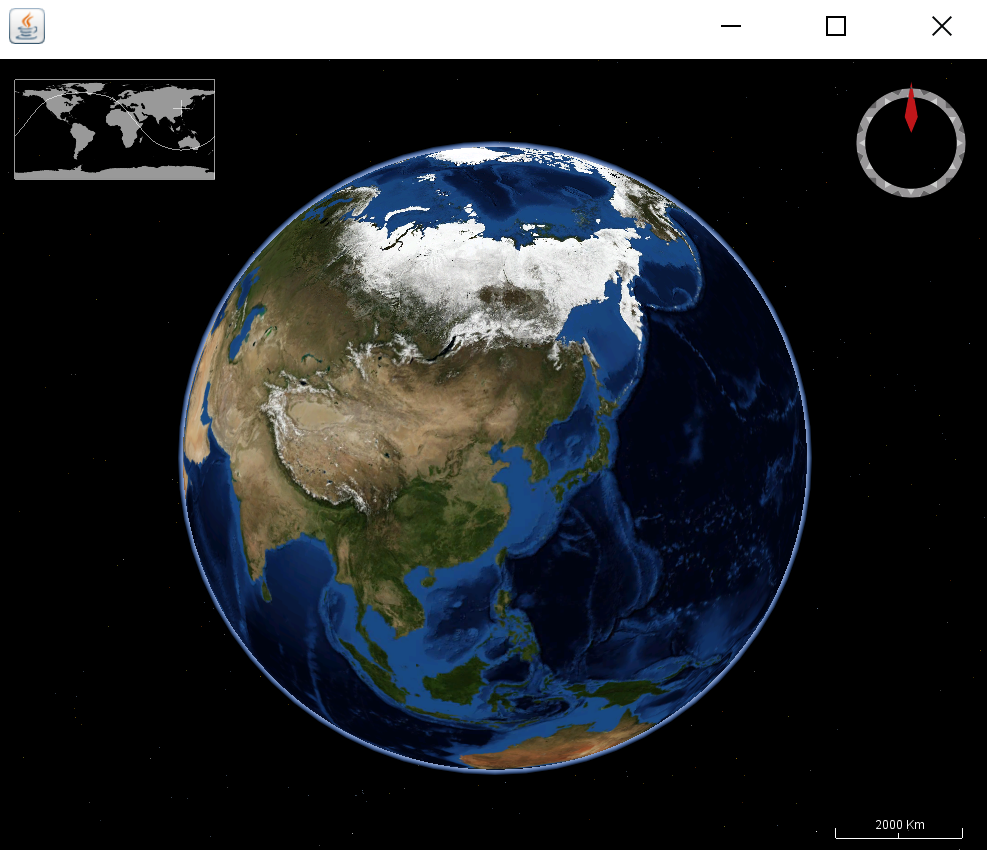
 > 如果你使用的是jdk8,这上图窗口中地图应该是铺满的,随着窗口大小的拖动界面内的布局会成百分比缩放,但字体、输入框则不会变大。如果jdk版本是9或以上版本,则支持图形、窗口和文本的自动缩放,而且提供了处理多分辨率图像的能力,适配不同的DPI。
在适配DPI的时候,内部的canvas大小`WorldWindowGLCanvas`不能和组件大小一致,这是JOGL中的GLCanvas在jdk9或以上版本中存在的显示问题。解决方法:
1. 降低jdk版本,jdk8可以解决这个问题,但程序不会适配DPI;
2. 使用`WorldWindowGLJPanel`替代`WorldWindowGLCanvas`;
3. 根据[ JOGL用户指南](http://download.java.net/media/jogl/doc/userguide/) 重写`WorldWindowGLCanvas`的getPreferredSize()方法。
程序可以在Globe中进行3D(Round)和2D(Flat)的切换,2维平面可以选择投影方式;选择加载的图层(Layers)。
上述的是运行演示demo的方法。
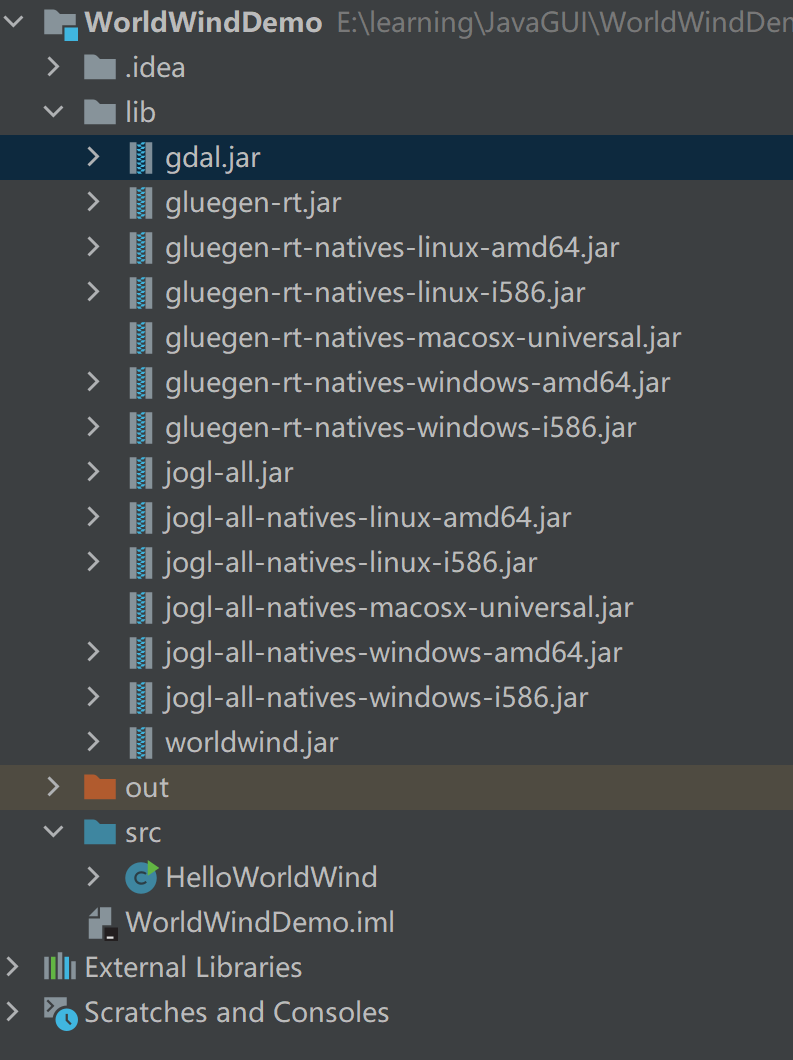
因为使用的是Swing + JOGL 进行OpenGL开发,所以要使用`WorldWind`进行开发需要的依赖有:
- `gdal.jar`
- OpenGL相关的`gluegen-rt.jar`、`jogl.jar`(以及四个OpenGL三维程序需要的四个`dll`文件(gluegen-rt.dll、jogl.dll、jogl_awt.dll、jogl_cg.dll))
- `worldwind.jar`
这些都可以在下载下来的worldwind-v2.1.0中找到,现在新建一个项目作为学习的示例demo:
> 如果你使用的是jdk8,这上图窗口中地图应该是铺满的,随着窗口大小的拖动界面内的布局会成百分比缩放,但字体、输入框则不会变大。如果jdk版本是9或以上版本,则支持图形、窗口和文本的自动缩放,而且提供了处理多分辨率图像的能力,适配不同的DPI。
在适配DPI的时候,内部的canvas大小`WorldWindowGLCanvas`不能和组件大小一致,这是JOGL中的GLCanvas在jdk9或以上版本中存在的显示问题。解决方法:
1. 降低jdk版本,jdk8可以解决这个问题,但程序不会适配DPI;
2. 使用`WorldWindowGLJPanel`替代`WorldWindowGLCanvas`;
3. 根据[ JOGL用户指南](http://download.java.net/media/jogl/doc/userguide/) 重写`WorldWindowGLCanvas`的getPreferredSize()方法。
程序可以在Globe中进行3D(Round)和2D(Flat)的切换,2维平面可以选择投影方式;选择加载的图层(Layers)。
上述的是运行演示demo的方法。
因为使用的是Swing + JOGL 进行OpenGL开发,所以要使用`WorldWind`进行开发需要的依赖有:
- `gdal.jar`
- OpenGL相关的`gluegen-rt.jar`、`jogl.jar`(以及四个OpenGL三维程序需要的四个`dll`文件(gluegen-rt.dll、jogl.dll、jogl_awt.dll、jogl_cg.dll))
- `worldwind.jar`
这些都可以在下载下来的worldwind-v2.1.0中找到,现在新建一个项目作为学习的示例demo:
 `HelloWorldWind.java`
```java
import gov.nasa.worldwind.BasicModel;
import gov.nasa.worldwind.Configuration;
import gov.nasa.worldwind.awt.WorldWindowGLCanvas;
public class HelloWorldWind
{
private static class AppFrame extends javax.swing.JFrame
{
public AppFrame()
{
WorldWindowGLCanvas wwd = new WorldWindowGLCanvas();
wwd.setPreferredSize(new java.awt.Dimension(1000, 800));
this.setDefaultCloseOperation(javax.swing.WindowConstants.EXIT_ON_CLOSE);
this.getContentPane().add(wwd, java.awt.BorderLayout.CENTER);
this.pack();
wwd.setModel(new BasicModel());
}
}
public static void main(String[] args)
{
if (Configuration.isMacOS())
{
System.setProperty("com.apple.mrj.application.apple.menu.about.name", "Hello World Wind");
}
java.awt.EventQueue.invokeLater(new Runnable()
{
public void run()
{
new AppFrame().setVisible(true);
}
});
}
}
```
`HelloWorldWind.java`
```java
import gov.nasa.worldwind.BasicModel;
import gov.nasa.worldwind.Configuration;
import gov.nasa.worldwind.awt.WorldWindowGLCanvas;
public class HelloWorldWind
{
private static class AppFrame extends javax.swing.JFrame
{
public AppFrame()
{
WorldWindowGLCanvas wwd = new WorldWindowGLCanvas();
wwd.setPreferredSize(new java.awt.Dimension(1000, 800));
this.setDefaultCloseOperation(javax.swing.WindowConstants.EXIT_ON_CLOSE);
this.getContentPane().add(wwd, java.awt.BorderLayout.CENTER);
this.pack();
wwd.setModel(new BasicModel());
}
}
public static void main(String[] args)
{
if (Configuration.isMacOS())
{
System.setProperty("com.apple.mrj.application.apple.menu.about.name", "Hello World Wind");
}
java.awt.EventQueue.invokeLater(new Runnable()
{
public void run()
{
new AppFrame().setVisible(true);
}
});
}
}
```
 ### 3. 基本概念
`WorldWind`是一个在Java应用程序中展示可交互的三维地理信息组件的集合。
程序通过在用户界面中放置一个或多个`WorldWindow`对象来使用`WorldWind`。
> `WorldWindow`为应用程序的信息和行为提供了3D地理环境。
`WorldWind`组件是可扩展的。API主要是通过接口定义的(面向接口编程,多态),因此组件可以被替代组件选择性地替换。具体类也可以被替换或扩展。可扩展性是WorldWind的一个基本目标。
除了`WorldWindow`外,`WorldWind`还有以下几个主要接口:
### 3. 基本概念
`WorldWind`是一个在Java应用程序中展示可交互的三维地理信息组件的集合。
程序通过在用户界面中放置一个或多个`WorldWindow`对象来使用`WorldWind`。
> `WorldWindow`为应用程序的信息和行为提供了3D地理环境。
`WorldWind`组件是可扩展的。API主要是通过接口定义的(面向接口编程,多态),因此组件可以被替代组件选择性地替换。具体类也可以被替换或扩展。可扩展性是WorldWind的一个基本目标。
除了`WorldWindow`外,`WorldWind`还有以下几个主要接口:
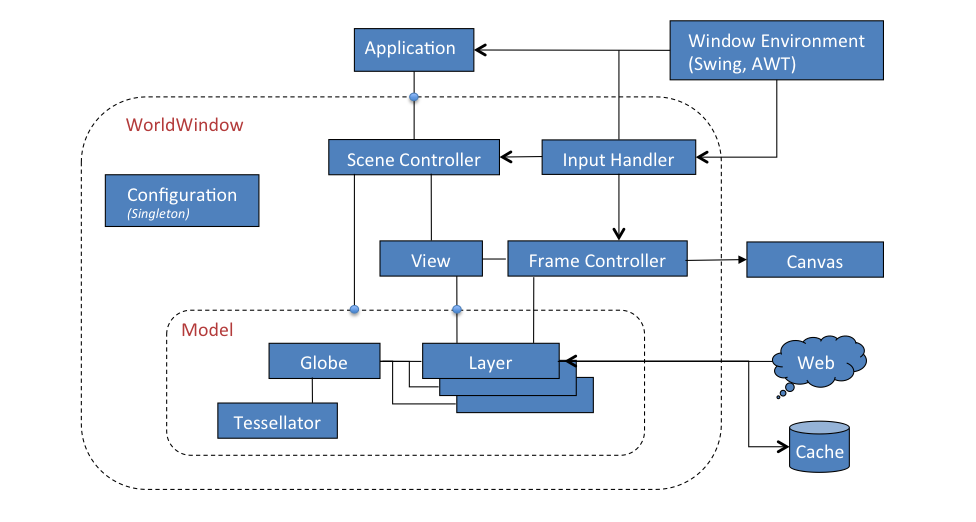
图 3-1
- `Globe`代表一个星球的形状和地形。`Globe`有一个`Tessellator`作为地形数据的提供者。
- `Layer`负责在`Globe`上渲染imagery(影像)、shapes(形状)以及其它信息。当用户在地理位置上导航时,这些渲染的实例都保持它们相对于地球的地理位置。`Layer`还提供相对于屏幕平面的图层,图层内的图形不会随球体移动。
- `Model`用于集成`Globe`和`Layers`,包括`in-screen layers`(相对于屏幕的图层)
- `View`决定用户对`Model`的视图(视野位置和角度等),是由用户通过`InputHandler`的输入事件驱动的。
- `SceneController `控制`Model`的渲染和渲染的时间。它将`Model`和`View`关联起来。
常用步骤流程:
`Application`为其数据创建一个`Globe`和`Layers`,并将它们组合到一个`Model`中。同时创建一个`WorldWindow`并将`Model`传递给它。随后`WorldWindow`的`SceneController `会负责管理`globe`和`layers`的展示,与 用户交互的`View`一起使用。
----
### 4. 核心类
WorldWind是一组组件,它们在Java应用程序中交互式地显示3D地理信息。应用程序通过在用户界面中放置一个或多个*`WorldWindow`*组件来使用WorldWind。`WorldWind`组件是可扩展的。API主要是通过接口定义的,因此组件可以被替代组件(*即接口的多种类型的实现之间相互替换*)选择性地替换。
> WorldWindow是一个接口,为Swing/AWT以及将来的SWT-Eclipse提供了特定于工具包的接口实现。
除了*`WorldWindow`*接口外,worldwind还有五个主要的接口:
1. *[`Globe`](https://nasaworldwind.github.io/WorldWindJava/gov/nasa/worldwind/globes/Globe.html)* — represents a planet's shape and terrain.
2. *[`Layer`](https://nasaworldwind.github.io/WorldWindJava/gov/nasa/worldwind/layers/Layer.html)* — applies imagery or information to a `Globe`.
3. *[`Model`](https://nasaworldwind.github.io/WorldWindJava/gov/nasa/worldwind/Model.html)* — aggregates a `Globe` and the `Layer`s to apply to it.
4. *[`SceneController`](https://nasaworldwind.github.io/WorldWindJava/gov/nasa/worldwind/SceneController.html)* — controls the rendering of a `Model`.
5. *[`View`](https://nasaworldwind.github.io/WorldWindJava/gov/nasa/worldwind/View.html)* — interactively controls the user's view of the model.
#### WorldWindow
从图3-1中可以看出,`WorldWindow`是核心组件,所以`WorldWindowJava`提供了*WorldWindow*接口,有很多类型的实现,如`WorldWindowGLJPanel`、`WorldWindowGLCanvas`等。
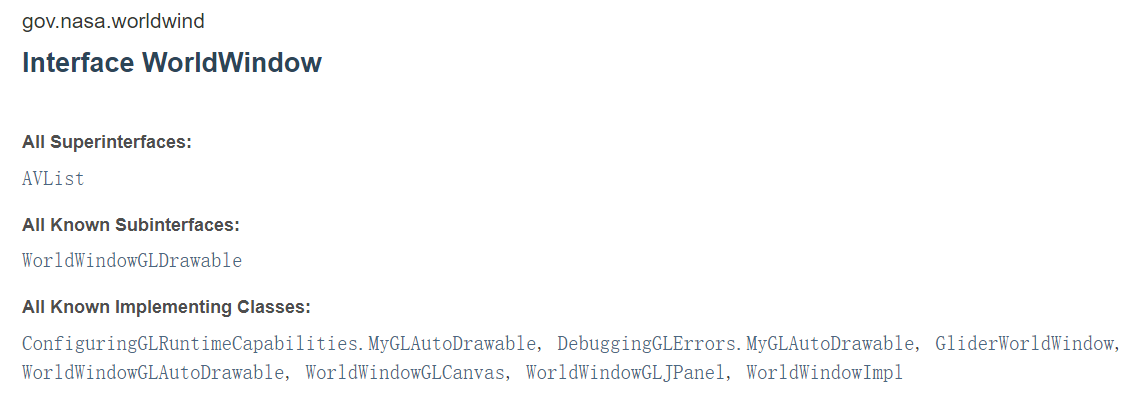 - `WorldWindowGLCanvas`:是用于显示WorldWind [`Model`](https://nasaworldwind.github.io/WorldWindJava/gov/nasa/worldwind/Model.html)(`Globe`和`Layer`)的【**重量级**】AWT组件。它是一个独立的组件,旨在用作应用程序的`WorldWindow`。它继承了`GLCanvas`。
- `WorldWindowGLJPanel`:是一个【**轻巧级**】的Swing组件,用于显示WorldWind [`Model`](https://nasaworldwind.github.io/WorldWindJava/gov/nasa/worldwind/Model.html)(`Globe`和`Layer`),它也是一个独立的组件,旨在用作应用程序的`WorldWindow`。它继承了`GLJPanel`。
> Java SDK for OpenGL (JOGL)对`GLJPanel`的支持一直存在问题。它在某些设备上运行良好,但在其他设备上却不行,并且其性能在各设备上的变化要比重量级同类产品大得多[`WorldWindowGLCanvas`](https://nasaworldwind.github.io/WorldWindJava/gov/nasa/worldwind/awt/WorldWindowGLCanvas.html)。
>
> 重量级AWT组件可以与轻型Swing组件结合使用。
[ JOGL用户指南](http://download.java.net/media/jogl/doc/userguide/)的*重量级和轻量级问题*部分描述相关bug(显示大小、闪烁等问题)。
> JOGL提供了重量级(GLCanvas)和轻量级(GLJPanel)小部件,从而能够为需要它的应用程序提供最快的性能,并为需要它的应用程序提供100%正确的Swing集成。GLCanvas通常提供比GLJPanel更高的性能。
**常用方法**:
- **[getCurrentPosition](https://nasaworldwind.github.io/WorldWindJava/gov/nasa/worldwind/awt/WorldWindowGLJPanel.html#getCurrentPosition--)**():返回当前鼠标位置的当前纬度、经度和高度,如果鼠标不在globe上,则返回null。
- **[getGpuResourceCache](https://nasaworldwind.github.io/WorldWindJava/gov/nasa/worldwind/awt/WorldWindowGLJPanel.html#getGpuResourceCache--)**():返回该worldwind上使用的GPU资源;
- **[getModel](https://nasaworldwind.github.io/WorldWindJava/gov/nasa/worldwind/awt/WorldWindowGLJPanel.html#getModel--)**():返回该worldwind中的model;
- **[getSceneController](https://nasaworldwind.github.io/WorldWindJava/gov/nasa/worldwind/awt/WorldWindowGLJPanel.html#getSceneController--)**():返回关联的Scene Controller场景
- **[getView](https://nasaworldwind.github.io/WorldWindJava/gov/nasa/worldwind/awt/WorldWindowGLJPanel.html#getView--)**():返回worldwind中的view
- **[addPositionListener](https://nasaworldwind.github.io/WorldWindJava/gov/nasa/worldwind/awt/WorldWindowGLJPanel.html#addPositionListener-gov.nasa.worldwind.event.PositionListener-)**([PositionListener](https://nasaworldwind.github.io/WorldWindJava/gov/nasa/worldwind/event/PositionListener.html) listener):添加位置变化监听
---
#### Globe
> 在worldwind中*Globe*接口代表一个星球的形状和地形,球体可以与提供地球表面地理位置的高程的(*ElevationModel*)高程模型相关联。
Globe提供了将地理位置(纬度、经度和海拔)与笛卡尔坐标相互转换的方法,其中笛卡尔坐标系的原点和方向由该接口的实现决定。
地心笛卡尔坐标系、经纬度地理坐标系
**笛卡尔坐标的计算**:
Globe提供了在以笛卡尔坐标表示的Globe表面的坐标系统中执行计算的方法,这些方法在三维笛卡尔坐标下根据地球的实际形状执行工作。对于椭球,这些方法等价于下面的椭球坐标计算。对于Globe2D的一个实例,这些方法在由球体的2D投影指定的笛卡尔坐标下工作。
```java
//从纬度、经度和高程计算一个笛卡尔点,即地理坐标-->笛卡尔坐标。
Vec4 computePointFromPosition(Angle latitude, Angle longitude, double metersElevation)
//矢量点转为经纬度的位置,地理坐标。
Position computePositionFromPoint(Vec4 point)
//用经纬度计算垂直于地球表面的笛卡尔坐标。
Vec4 computeSurfaceNormalAtLocation(Angle latitude,Angle longitude)
//返回将模型坐标映射到本地坐标系统(纬度、经度、度量)的笛卡尔变换矩阵。
Matrix computeSurfaceOrientationAtPosition(Angle latitude,Angle longitude,double metersElevation)
```
**在椭球体上的坐标计算**:
```java
//返回的点是地球的赤道半径和极半径的函数,并且总是表示在三维笛卡尔坐标中与指定位置相对应的椭球上的一个点。
Vec4 computeEllipsoidalPointFromPosition(Angle latitude,Angle longitude,double metersElevation)
//矢量Vec4(x,y,z,w)--> position 经纬度高程
Position computePositionFromEllipsoidalPoint(Vec4 ellipsoidalPoint)
```
实现类有[Earth](https://nasaworldwind.github.io/WorldWindJava/gov/nasa/worldwind/globes/Earth.html), [EarthFlat](https://nasaworldwind.github.io/WorldWindJava/gov/nasa/worldwind/globes/EarthFlat.html), [EllipsoidalGlobe](https://nasaworldwind.github.io/WorldWindJava/gov/nasa/worldwind/globes/EllipsoidalGlobe.html), [FlatGlobe](https://nasaworldwind.github.io/WorldWindJava/gov/nasa/worldwind/globes/FlatGlobe.html) 。
- EllipsoidalGlobe:定义一个globe作为椭球的模式。globe使用的是Y轴指向北极的笛卡尔坐标系。
Z轴在赤道面上指向本初子午线和赤道的交点。
X轴是一个右手坐标系,它在Z轴以东90度,也在赤道平面上。
海平面在z = 0处。默认情况下,坐标系统的原点位于球体的中心,但可以在构造球体时设置为不同的点。
- `WorldWindowGLCanvas`:是用于显示WorldWind [`Model`](https://nasaworldwind.github.io/WorldWindJava/gov/nasa/worldwind/Model.html)(`Globe`和`Layer`)的【**重量级**】AWT组件。它是一个独立的组件,旨在用作应用程序的`WorldWindow`。它继承了`GLCanvas`。
- `WorldWindowGLJPanel`:是一个【**轻巧级**】的Swing组件,用于显示WorldWind [`Model`](https://nasaworldwind.github.io/WorldWindJava/gov/nasa/worldwind/Model.html)(`Globe`和`Layer`),它也是一个独立的组件,旨在用作应用程序的`WorldWindow`。它继承了`GLJPanel`。
> Java SDK for OpenGL (JOGL)对`GLJPanel`的支持一直存在问题。它在某些设备上运行良好,但在其他设备上却不行,并且其性能在各设备上的变化要比重量级同类产品大得多[`WorldWindowGLCanvas`](https://nasaworldwind.github.io/WorldWindJava/gov/nasa/worldwind/awt/WorldWindowGLCanvas.html)。
>
> 重量级AWT组件可以与轻型Swing组件结合使用。
[ JOGL用户指南](http://download.java.net/media/jogl/doc/userguide/)的*重量级和轻量级问题*部分描述相关bug(显示大小、闪烁等问题)。
> JOGL提供了重量级(GLCanvas)和轻量级(GLJPanel)小部件,从而能够为需要它的应用程序提供最快的性能,并为需要它的应用程序提供100%正确的Swing集成。GLCanvas通常提供比GLJPanel更高的性能。
**常用方法**:
- **[getCurrentPosition](https://nasaworldwind.github.io/WorldWindJava/gov/nasa/worldwind/awt/WorldWindowGLJPanel.html#getCurrentPosition--)**():返回当前鼠标位置的当前纬度、经度和高度,如果鼠标不在globe上,则返回null。
- **[getGpuResourceCache](https://nasaworldwind.github.io/WorldWindJava/gov/nasa/worldwind/awt/WorldWindowGLJPanel.html#getGpuResourceCache--)**():返回该worldwind上使用的GPU资源;
- **[getModel](https://nasaworldwind.github.io/WorldWindJava/gov/nasa/worldwind/awt/WorldWindowGLJPanel.html#getModel--)**():返回该worldwind中的model;
- **[getSceneController](https://nasaworldwind.github.io/WorldWindJava/gov/nasa/worldwind/awt/WorldWindowGLJPanel.html#getSceneController--)**():返回关联的Scene Controller场景
- **[getView](https://nasaworldwind.github.io/WorldWindJava/gov/nasa/worldwind/awt/WorldWindowGLJPanel.html#getView--)**():返回worldwind中的view
- **[addPositionListener](https://nasaworldwind.github.io/WorldWindJava/gov/nasa/worldwind/awt/WorldWindowGLJPanel.html#addPositionListener-gov.nasa.worldwind.event.PositionListener-)**([PositionListener](https://nasaworldwind.github.io/WorldWindJava/gov/nasa/worldwind/event/PositionListener.html) listener):添加位置变化监听
---
#### Globe
> 在worldwind中*Globe*接口代表一个星球的形状和地形,球体可以与提供地球表面地理位置的高程的(*ElevationModel*)高程模型相关联。
Globe提供了将地理位置(纬度、经度和海拔)与笛卡尔坐标相互转换的方法,其中笛卡尔坐标系的原点和方向由该接口的实现决定。
地心笛卡尔坐标系、经纬度地理坐标系
**笛卡尔坐标的计算**:
Globe提供了在以笛卡尔坐标表示的Globe表面的坐标系统中执行计算的方法,这些方法在三维笛卡尔坐标下根据地球的实际形状执行工作。对于椭球,这些方法等价于下面的椭球坐标计算。对于Globe2D的一个实例,这些方法在由球体的2D投影指定的笛卡尔坐标下工作。
```java
//从纬度、经度和高程计算一个笛卡尔点,即地理坐标-->笛卡尔坐标。
Vec4 computePointFromPosition(Angle latitude, Angle longitude, double metersElevation)
//矢量点转为经纬度的位置,地理坐标。
Position computePositionFromPoint(Vec4 point)
//用经纬度计算垂直于地球表面的笛卡尔坐标。
Vec4 computeSurfaceNormalAtLocation(Angle latitude,Angle longitude)
//返回将模型坐标映射到本地坐标系统(纬度、经度、度量)的笛卡尔变换矩阵。
Matrix computeSurfaceOrientationAtPosition(Angle latitude,Angle longitude,double metersElevation)
```
**在椭球体上的坐标计算**:
```java
//返回的点是地球的赤道半径和极半径的函数,并且总是表示在三维笛卡尔坐标中与指定位置相对应的椭球上的一个点。
Vec4 computeEllipsoidalPointFromPosition(Angle latitude,Angle longitude,double metersElevation)
//矢量Vec4(x,y,z,w)--> position 经纬度高程
Position computePositionFromEllipsoidalPoint(Vec4 ellipsoidalPoint)
```
实现类有[Earth](https://nasaworldwind.github.io/WorldWindJava/gov/nasa/worldwind/globes/Earth.html), [EarthFlat](https://nasaworldwind.github.io/WorldWindJava/gov/nasa/worldwind/globes/EarthFlat.html), [EllipsoidalGlobe](https://nasaworldwind.github.io/WorldWindJava/gov/nasa/worldwind/globes/EllipsoidalGlobe.html), [FlatGlobe](https://nasaworldwind.github.io/WorldWindJava/gov/nasa/worldwind/globes/FlatGlobe.html) 。
- EllipsoidalGlobe:定义一个globe作为椭球的模式。globe使用的是Y轴指向北极的笛卡尔坐标系。
Z轴在赤道面上指向本初子午线和赤道的交点。
X轴是一个右手坐标系,它在Z轴以东90度,也在赤道平面上。
海平面在z = 0处。默认情况下,坐标系统的原点位于球体的中心,但可以在构造球体时设置为不同的点。
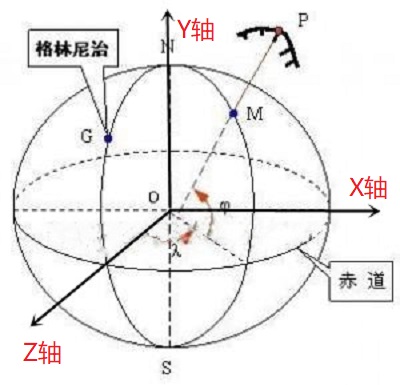 - FlatGlobe:继承EllipsoidalGlobe,表示一个投影到平面上的globe,默认是墨卡托投影。这个globe使用的是笛卡尔坐标系,Y轴指向北极,Z轴指向屏幕向上,X轴完成了一个右手坐标系,指向东,原点在经纬度都为0的地方。
- Earth:继承EllipsoidalGlobe,表示一个地球模式,使用的是WGS84坐标系统;
- EarthFlat:继承FlatGlobe,表示一个地球投影到平面上的模式,地球的半径采用WGS84中的半径。
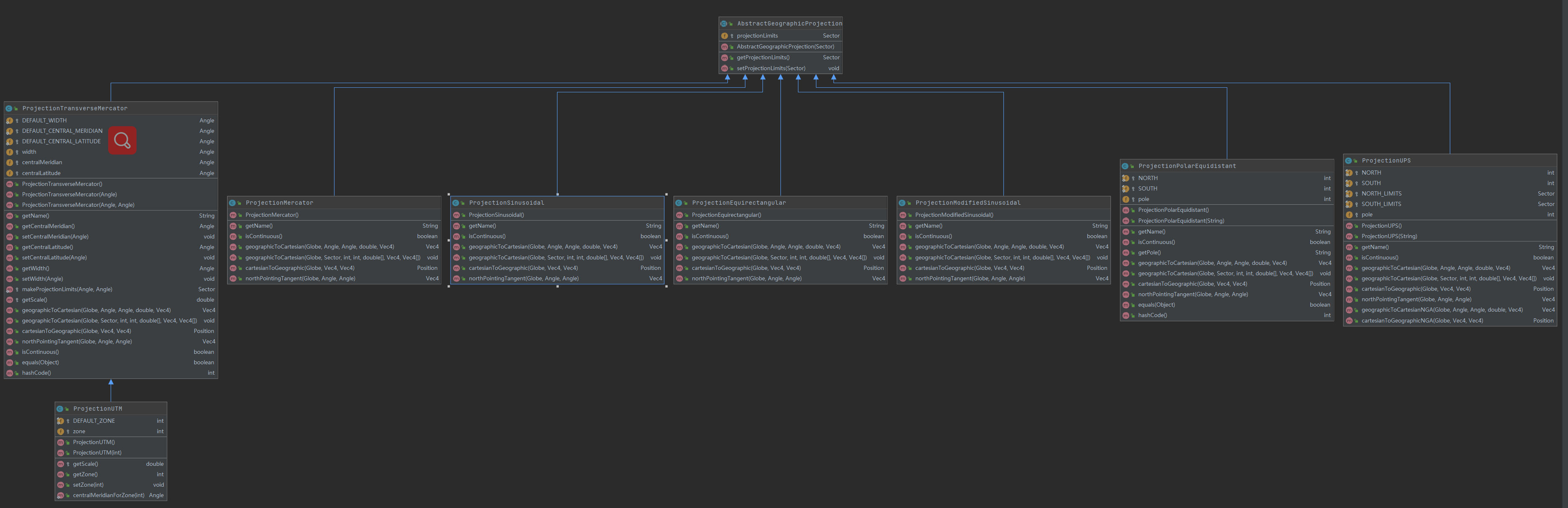
对于二维平面的FlatGlobe和EarthFlat,可以使用[setProjection](https://nasaworldwind.github.io/WorldWindJava/gov/nasa/worldwind/globes/FlatGlobe.html#setProjection-gov.nasa.worldwind.globes.GeographicProjection-)方法修改投影。
**投影相关类**:
- [AbstractGeographicProjection](https://nasaworldwind.github.io/WorldWindJava/gov/nasa/worldwind/globes/projections/AbstractGeographicProjection.html)
- [ProjectionEquirectangular](https://nasaworldwind.github.io/WorldWindJava/gov/nasa/worldwind/globes/projections/ProjectionEquirectangular.html)
- [ProjectionMercator](https://nasaworldwind.github.io/WorldWindJava/gov/nasa/worldwind/globes/projections/ProjectionMercator.html)
- [ProjectionModifiedSinusoidal](https://nasaworldwind.github.io/WorldWindJava/gov/nasa/worldwind/globes/projections/ProjectionModifiedSinusoidal.html)
- [ProjectionPolarEquidistant](https://nasaworldwind.github.io/WorldWindJava/gov/nasa/worldwind/globes/projections/ProjectionPolarEquidistant.html)
- [ProjectionSinusoidal](https://nasaworldwind.github.io/WorldWindJava/gov/nasa/worldwind/globes/projections/ProjectionSinusoidal.html)
- [ProjectionTransverseMercator](https://nasaworldwind.github.io/WorldWindJava/gov/nasa/worldwind/globes/projections/ProjectionTransverseMercator.html)
- [ProjectionUPS](https://nasaworldwind.github.io/WorldWindJava/gov/nasa/worldwind/globes/projections/ProjectionUPS.html)
- [ProjectionUTM](https://nasaworldwind.github.io/WorldWindJava/gov/nasa/worldwind/globes/projections/ProjectionUTM.html)
---
#### Layer
*Layer*接口定义了大部分图层公共的操作:
- FlatGlobe:继承EllipsoidalGlobe,表示一个投影到平面上的globe,默认是墨卡托投影。这个globe使用的是笛卡尔坐标系,Y轴指向北极,Z轴指向屏幕向上,X轴完成了一个右手坐标系,指向东,原点在经纬度都为0的地方。
- Earth:继承EllipsoidalGlobe,表示一个地球模式,使用的是WGS84坐标系统;
- EarthFlat:继承FlatGlobe,表示一个地球投影到平面上的模式,地球的半径采用WGS84中的半径。
对于二维平面的FlatGlobe和EarthFlat,可以使用[setProjection](https://nasaworldwind.github.io/WorldWindJava/gov/nasa/worldwind/globes/FlatGlobe.html#setProjection-gov.nasa.worldwind.globes.GeographicProjection-)方法修改投影。
**投影相关类**:
- [AbstractGeographicProjection](https://nasaworldwind.github.io/WorldWindJava/gov/nasa/worldwind/globes/projections/AbstractGeographicProjection.html)
- [ProjectionEquirectangular](https://nasaworldwind.github.io/WorldWindJava/gov/nasa/worldwind/globes/projections/ProjectionEquirectangular.html)
- [ProjectionMercator](https://nasaworldwind.github.io/WorldWindJava/gov/nasa/worldwind/globes/projections/ProjectionMercator.html)
- [ProjectionModifiedSinusoidal](https://nasaworldwind.github.io/WorldWindJava/gov/nasa/worldwind/globes/projections/ProjectionModifiedSinusoidal.html)
- [ProjectionPolarEquidistant](https://nasaworldwind.github.io/WorldWindJava/gov/nasa/worldwind/globes/projections/ProjectionPolarEquidistant.html)
- [ProjectionSinusoidal](https://nasaworldwind.github.io/WorldWindJava/gov/nasa/worldwind/globes/projections/ProjectionSinusoidal.html)
- [ProjectionTransverseMercator](https://nasaworldwind.github.io/WorldWindJava/gov/nasa/worldwind/globes/projections/ProjectionTransverseMercator.html)
- [ProjectionUPS](https://nasaworldwind.github.io/WorldWindJava/gov/nasa/worldwind/globes/projections/ProjectionUPS.html)
- [ProjectionUTM](https://nasaworldwind.github.io/WorldWindJava/gov/nasa/worldwind/globes/projections/ProjectionUTM.html)

---
#### Layer
*Layer*接口定义了大部分图层公共的操作:
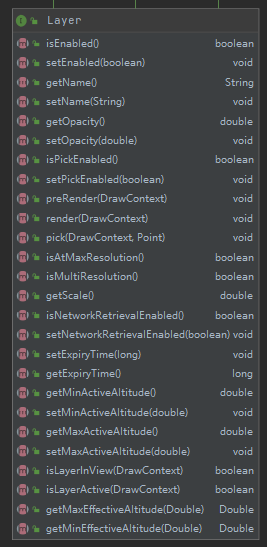 如图层的请求超时时间、图层名、透明度、是否加载到View中、当前缩放级别Scale、最大有效经纬度等方法。
*AbstractLayer*实现*Layer*接口,增加一些与配置文件,加载参数相关的规范。具体的实现有:
- AnnotationLayer:注记图层
- IconLayer:图标图层
- MarkerLayer:标注图层
- RenderableLayer:渲染图层,用于管理可渲染对象的集合
- ScalebarLayer:比例尺图层,在屏幕一角呈现一个比例尺图形
- SkyColorLayer:天空颜色图层
- StarsLayer:星星图层
- SurfaceImageLayer:表面影像图层
- TerainProfileLayer:地形剖面图层,在屏幕一角显示地形剖面图。
- ViewControlsLayer:这个图层显示在屏幕View控件上。可以控制平移,缩放,标题,俯仰,倾斜,视野和垂直放大。每个控件都可以单独启用或禁用。这个类的实例依赖于ViewControlsSelectListener的实例来控制它。select监听器必须通过WorldWindow.addSelectListener(gov.nasa. worldwind.com event. selectlistener)注册。
- ViewControlsSelectListener:由ViewControlsLayer显示的屏幕上视图控件的控制器。
- WorldMapLayer:类似鹰眼的控件图层,显示世界地图覆盖与当前位置十字准星在屏幕角落。
WorldWind中加载的图层常常是加载的通过Web请求加载的地图服务瓦片,这些服务的地址都在worldwind.jar中的config目录下,使用方式是:
- 创建`AVKey`接口,定义了与配置文件中key相对应的常量;
- 使用`Configuration`类来加载WorldWind初始化的参数和注册其内容。
---
#### Configuration
> `Configuration`管理`WorldWind`的初始配置。
它读取WorldWind配置文件并注册其内容。配置文件包含要在运行时创建的类的名称、model配置(包括globe,elevation model 高程模型和layers)以及各种控制量(例如缓存大小和数据检索超时等)。
```java
public class Configuration // Singleton
{
...
private static final String CONFIG_WW_DOCUMENT_NAME = "config/worldwind.xml";
private static final String CONFIG_APP_DOCUMENT_KEY = "gov.nasa.worldwind.app.config.document";
private static Configuration ourInstance = new Configuration();
private static Configuration getInstance(){
return ourInstance;
}
...
}
```
如图层的请求超时时间、图层名、透明度、是否加载到View中、当前缩放级别Scale、最大有效经纬度等方法。
*AbstractLayer*实现*Layer*接口,增加一些与配置文件,加载参数相关的规范。具体的实现有:
- AnnotationLayer:注记图层
- IconLayer:图标图层
- MarkerLayer:标注图层
- RenderableLayer:渲染图层,用于管理可渲染对象的集合
- ScalebarLayer:比例尺图层,在屏幕一角呈现一个比例尺图形
- SkyColorLayer:天空颜色图层
- StarsLayer:星星图层
- SurfaceImageLayer:表面影像图层
- TerainProfileLayer:地形剖面图层,在屏幕一角显示地形剖面图。
- ViewControlsLayer:这个图层显示在屏幕View控件上。可以控制平移,缩放,标题,俯仰,倾斜,视野和垂直放大。每个控件都可以单独启用或禁用。这个类的实例依赖于ViewControlsSelectListener的实例来控制它。select监听器必须通过WorldWindow.addSelectListener(gov.nasa. worldwind.com event. selectlistener)注册。
- ViewControlsSelectListener:由ViewControlsLayer显示的屏幕上视图控件的控制器。
- WorldMapLayer:类似鹰眼的控件图层,显示世界地图覆盖与当前位置十字准星在屏幕角落。
WorldWind中加载的图层常常是加载的通过Web请求加载的地图服务瓦片,这些服务的地址都在worldwind.jar中的config目录下,使用方式是:
- 创建`AVKey`接口,定义了与配置文件中key相对应的常量;
- 使用`Configuration`类来加载WorldWind初始化的参数和注册其内容。
---
#### Configuration
> `Configuration`管理`WorldWind`的初始配置。
它读取WorldWind配置文件并注册其内容。配置文件包含要在运行时创建的类的名称、model配置(包括globe,elevation model 高程模型和layers)以及各种控制量(例如缓存大小和数据检索超时等)。
```java
public class Configuration // Singleton
{
...
private static final String CONFIG_WW_DOCUMENT_NAME = "config/worldwind.xml";
private static final String CONFIG_APP_DOCUMENT_KEY = "gov.nasa.worldwind.app.config.document";
private static Configuration ourInstance = new Configuration();
private static Configuration getInstance(){
return ourInstance;
}
...
}
```
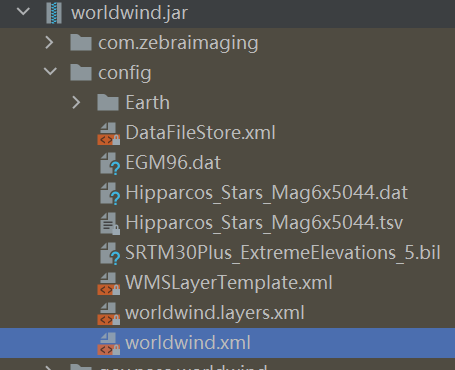 `Configuration`类是一个单例,构造器是私有的。它只能通过该类的静态方法得到实例。它是在首次使用其任何静态方法时构建的。
首次实例化`Configuration`类时,它将读取XML文档`config/worldwind.xml`并在其中注册所有信息。随后可以通过类的各种`getValue`方法来检索信息 。许多WorldWind启动对象查询此信息以确定要创建的类。例如,应用程序创建的第一个WorldWind对象通常是`WorldWindowGLCanvas`。在构造期间,该类使用从Configuration单例(该类)中提取的那些类的名称来构造WorldWind的内部类。
`Configuration.java`常和`AVKey.java`一起搭配使用,`AVKey`是一个接口,用于配置系统常量,其中包含`config/worldwind.xml`配置文件中的Key。
```xml
...
```
```java
...
final String MODEL_CLASS_NAME = "gov.nasa.worldwind.avkey.ModelClassName";
final String GLOBE_CLASS_NAME = "gov.nasa.worldwind.avkey.GlobeClassName";
final String EARTH_ELEVATION_MODEL_CONFIG_FILE = "gov.nasa.worldwind.avkey.EarthElevationModelConfigFile";
...
```
---
#### Model
model接口用于集成一个`Globe`实例和多个`Layer`图层,通过globe可以间接包括elevation model 高程模型。默认的Model会在`worldwind.xml`中定义:
```xml
```
AVKey.java中的对应的常量:
```java
final String MODEL_CLASS_NAME = "gov.nasa.worldwind.avkey.ModelClassName";
```
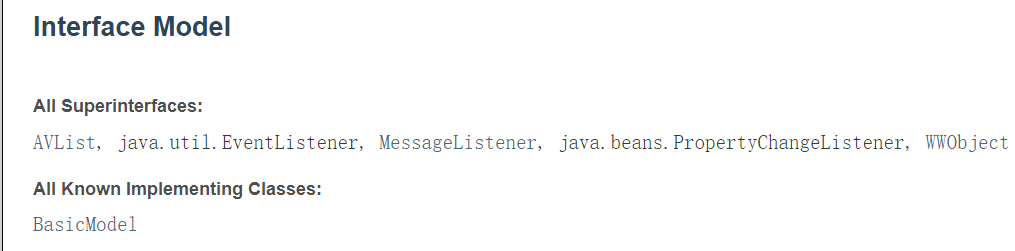
实现类只有[BasicModel](https://nasaworldwind.github.io/WorldWindJava/gov/nasa/worldwind/BasicModel.html) 。常用方法:
- getExtent:返回model在笛卡尔坐标系中的边界范围;
- getGlobe/setGlobe
- getLayers/setLayers
---
#### View
`Configuration`类是一个单例,构造器是私有的。它只能通过该类的静态方法得到实例。它是在首次使用其任何静态方法时构建的。
首次实例化`Configuration`类时,它将读取XML文档`config/worldwind.xml`并在其中注册所有信息。随后可以通过类的各种`getValue`方法来检索信息 。许多WorldWind启动对象查询此信息以确定要创建的类。例如,应用程序创建的第一个WorldWind对象通常是`WorldWindowGLCanvas`。在构造期间,该类使用从Configuration单例(该类)中提取的那些类的名称来构造WorldWind的内部类。
`Configuration.java`常和`AVKey.java`一起搭配使用,`AVKey`是一个接口,用于配置系统常量,其中包含`config/worldwind.xml`配置文件中的Key。
```xml
...
```
```java
...
final String MODEL_CLASS_NAME = "gov.nasa.worldwind.avkey.ModelClassName";
final String GLOBE_CLASS_NAME = "gov.nasa.worldwind.avkey.GlobeClassName";
final String EARTH_ELEVATION_MODEL_CONFIG_FILE = "gov.nasa.worldwind.avkey.EarthElevationModelConfigFile";
...
```
---
#### Model
model接口用于集成一个`Globe`实例和多个`Layer`图层,通过globe可以间接包括elevation model 高程模型。默认的Model会在`worldwind.xml`中定义:
```xml
```
AVKey.java中的对应的常量:
```java
final String MODEL_CLASS_NAME = "gov.nasa.worldwind.avkey.ModelClassName";
```

实现类只有[BasicModel](https://nasaworldwind.github.io/WorldWindJava/gov/nasa/worldwind/BasicModel.html) 。常用方法:
- getExtent:返回model在笛卡尔坐标系中的边界范围;
- getGlobe/setGlobe
- getLayers/setLayers
---
#### View
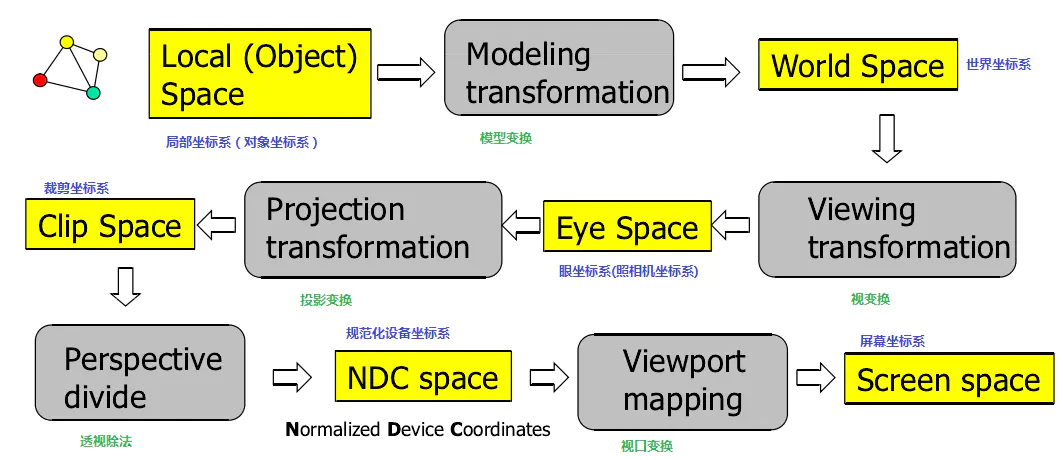
Local/Object Spcae转换到Screen space的过程
上图是OpenGL中坐标系中局部坐标系到屏幕坐标系的转换流程。
OpenGL中的五个Space和对应的坐标系:
1. Local(Object)Space:每个物体都有他们独立的坐标系;
2. World Space:为每一个物体定义一个位置,从而能在更大的世界当中放置它们;
3. Eye Space:从Camera相机的视角(透视投影)的坐标系统;
4. Clip Space:指定视景体(如平截头体Frustum),作为坐标范围裁剪,被裁剪掉的坐标就会被忽略,所以剩下的坐标就将变为屏幕上可见的片段
5. Screen Space:左上角为原点
*View*接口提供从Local coordinates 到eye coordinates(原点在视点,向下看负Z轴的右手坐标系)的转换方法。
*View*还提供了eye coordinates到 screen coordinates的转变方法,遵循OpenGL的约定,原点位于屏幕左下角。
View 上的大多数方法都取决于调用时View的状态
以下方法返回最近调用后,View的状态值:
- `getEyePosition`:返回视点的地理坐标(经纬度)
- `getEyePoint`:返回视点在3D笛卡尔坐标系中的坐标(x,y,z)
- `getUpVector`
- `getForwardVector`
- `getModelviewMatrix`
- `getViewport`:返回视口的边界(x,y,width,height)
- `getFrustum`:返回Eye Coordinates中的视锥体
- `getFrustumInModelCoordinates`
- `getProjectionMatrix`
下列方法的依赖于调用时View的状态值:
- `project`
- `unproject`
- `computeRayFromScreenPoint`
- `computePositionFromScreenPoint`
- `computePixelSizeAtDistance`
- `computeHorizonDistance`
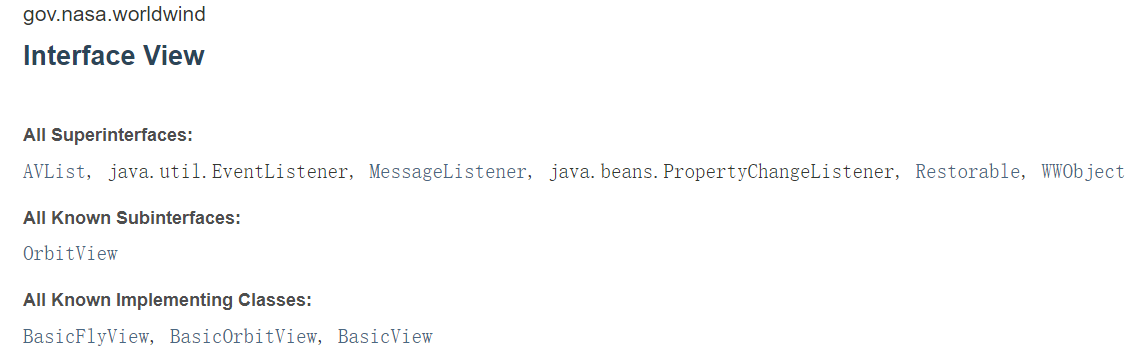
实现类有[BasicFlyView](https://nasaworldwind.github.io/WorldWindJava/gov/nasa/worldwind/view/firstperson/BasicFlyView.html), [BasicOrbitView](https://nasaworldwind.github.io/WorldWindJava/gov/nasa/worldwind/view/orbit/BasicOrbitView.html), [BasicView](https://nasaworldwind.github.io/WorldWindJava/gov/nasa/worldwind/view/BasicView.html) 。
- BasicView是View派生的一个基类,BasicFlyView和BasicOrbitView继承了BasicView ;它提供了一个从地心视图模型到3D图形模型视图矩阵的映射。BasicView也通过截锥来管理投影矩阵。
> BasicView模型中的view由地理位置position,仰角pitch,标题title,和滚动roll构成。
- BasicFlyView,这是一个基本的view,实现一个以第一人称风格的 yaw-pitch-roll model(偏航-俯仰-滚动)模型的视图应用程序。
> 俯仰角pitch定义为垂直于接地平面,而不像大多数机体轴线表示中的那样平行,这与WorldWind中的pitch定义一致。程序将需要通过增加90度来校正间距值(即,要获得水平视图,请输入90度间距。要向下进行,请输入0度)
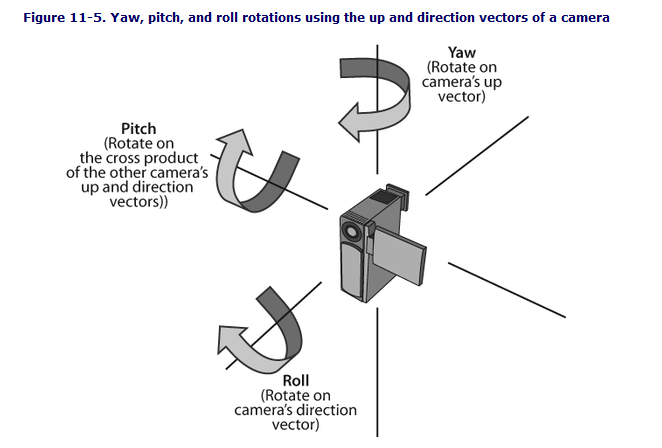
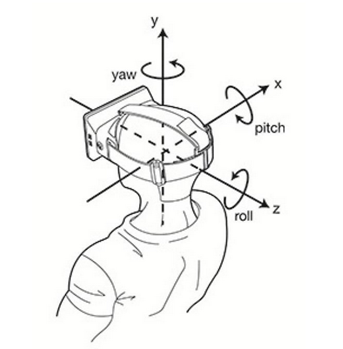 - BasicOrbitView,基本轨道视角
---
#### SceneController
`SceneController ` 是控制 `Model` 的渲染和渲染的时间的,且将`Model`和`View`关联起来。
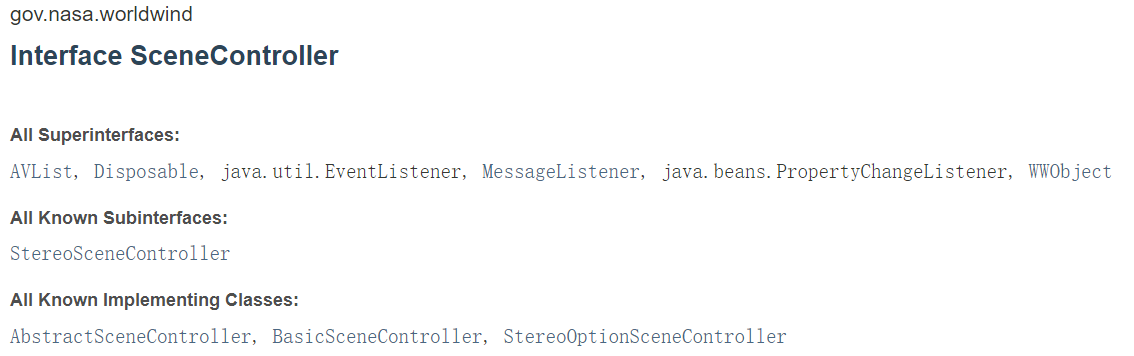
实现类 [StereoOptionSceneController](https://nasaworldwind.github.io/WorldWindJava/gov/nasa/worldwind/StereoOptionSceneController.html) 继承了[BasicSceneController](https://nasaworldwind.github.io/WorldWindJava/gov/nasa/worldwind/BasicSceneController.html) ([BasicSceneController](https://nasaworldwind.github.io/WorldWindJava/gov/nasa/worldwind/BasicSceneController.html)继承了[AbstractSceneController](https://nasaworldwind.github.io/WorldWindJava/gov/nasa/worldwind/AbstractSceneController.html))。
要使用设备支持的立体声,WorldWindow实例必须支持立体声。在创建立体声WorldWindow之前,通过指定上面描述的Java VM属性来选择它。
---
### 5. 几何对象
在`gov.nasa.worldwind.geom`包下可以了解到`WorldWind`的几何对象有:
- [Angle](https://nasaworldwind.github.io/WorldWindJava/gov/nasa/worldwind/geom/Angle.html) :表示一个几角度。其实例是不可变的(final修饰),可以通过静态的工厂方法 `fromDegrees(double)`和`fromRadians(double)` 获得。
- [BarycentricQuadrilateral](https://nasaworldwind.github.io/WorldWindJava/gov/nasa/worldwind/geom/BarycentricQuadrilateral.html) :
- [BarycentricTriangle](https://nasaworldwind.github.io/WorldWindJava/gov/nasa/worldwind/geom/BarycentricTriangle.html)
- [BilinearInterpolator](https://nasaworldwind.github.io/WorldWindJava/gov/nasa/worldwind/geom/BilinearInterpolator.html)
- [Box](https://nasaworldwind.github.io/WorldWindJava/gov/nasa/worldwind/geom/Box.html) :一个任意方向的盒子,通常用作点或形状集合的`bounding volume`。一个Box由三个正交的轴和每个轴上的两个位置定义。每个positions 都指定了box 沿各自轴的位置,这三个轴按惯例命名为“R”、“S”和“T”,并按长度递减顺序排列——R是最长的轴,其次是S,然后是T。
- [Cylinder](https://nasaworldwind.github.io/WorldWindJava/gov/nasa/worldwind/geom/Cylinder.html) :代表一个圆柱,最常用作为`bounding volume`,Cylinder也是不可变的。
- [Frustum](https://nasaworldwind.github.io/WorldWindJava/gov/nasa/worldwind/geom/Frustum.html) :表示view中由六个平面组成的平截头体( left, right, bottom, top, near ,far)
- [Frustum.Corners](https://nasaworldwind.github.io/WorldWindJava/gov/nasa/worldwind/geom/Frustum.Corners.html)
- [GeoQuad](https://nasaworldwind.github.io/WorldWindJava/gov/nasa/worldwind/geom/GeoQuad.html)
- [Intersection](https://nasaworldwind.github.io/WorldWindJava/gov/nasa/worldwind/geom/Intersection.html)
- [LatLon](https://nasaworldwind.github.io/WorldWindJava/gov/nasa/worldwind/geom/LatLon.html) :表示 globe 二维表面上的一个点。纬度是指北纬,范围在[- 90,90]之间,经度是指东经,范围在(- 180,180]之间。实例也是不可变的。
```java
LatLon(Angle latitude, Angle longitude)
```
- [Line](https://nasaworldwind.github.io/WorldWindJava/gov/nasa/worldwind/geom/Line.html) :表示线,使用两个Vec4点构造一条线
- [Matrix](https://nasaworldwind.github.io/WorldWindJava/gov/nasa/worldwind/geom/Matrix.html) :矩阵
- [PickPointFrustum](https://nasaworldwind.github.io/WorldWindJava/gov/nasa/worldwind/geom/PickPointFrustum.html) :一个视口对齐的截锥,它还存储截锥所包含的2D屏幕矩形。
- [Plane](https://nasaworldwind.github.io/WorldWindJava/gov/nasa/worldwind/geom/Plane.html) :表示笛卡尔坐标下的平面,由平面的法向量和与平面到原点的距离成比例的带符号标量值定义。值的符号是相对于平面法线方向的。
```java
Plane(double nx, double ny, double nz, double d)
Plane(Vec4 vec)
```
- [PolarPoint](https://nasaworldwind.github.io/WorldWindJava/gov/nasa/worldwind/geom/PolarPoint.html) :表示空间中由纬度、经度和到原点的距离定义的点(lat, long, r)
- [Position](https://nasaworldwind.github.io/WorldWindJava/gov/nasa/worldwind/geom/Position.html) :带有高程的位置点(lat,long,elev)
```java
Position(Angle latitude, Angle longitude, double elevation)
Position(LatLon latLon, double elevation)
```
- [Position.PositionList](https://nasaworldwind.github.io/WorldWindJava/gov/nasa/worldwind/geom/Position.PositionList.html)
- [Quaternion](https://nasaworldwind.github.io/WorldWindJava/gov/nasa/worldwind/geom/Quaternion.html) :四元数(x,y,z,w)
- [Sector](https://nasaworldwind.github.io/WorldWindJava/gov/nasa/worldwind/geom/Sector.html) :扇区,表示经纬度的矩形区域。区域由四个角度定义:最小和最大纬度,最小和最大经度。假设角度归一化为+/- 90度纬度和+/- 180度经度。最小值和最大值是相对于这些范围的,例如,-80小于20。
```java
Sector(Angle minLatitude, Angle maxLatitude, Angle minLongitude, Angle maxLongitude)
```
- [Sphere](https://nasaworldwind.github.io/WorldWindJava/gov/nasa/worldwind/geom/Sphere.html) :表示三维空间中的球体。
```java
//中点加半径
Sphere(Vec4 center, double radius)
```
- [Triangle](https://nasaworldwind.github.io/WorldWindJava/gov/nasa/worldwind/geom/Triangle.html) :提供对三角形的操作。
```java
//用三个逆时针顺序的顶点构造一个三角形。
Triangle(Vec4 a, Vec4 b, Vec4 c)
```
- [Triangle.TriangleIntersection](https://nasaworldwind.github.io/WorldWindJava/gov/nasa/worldwind/geom/Triangle.TriangleIntersection.html)
- [Vec4](https://nasaworldwind.github.io/WorldWindJava/gov/nasa/worldwind/geom/Vec4.html) :四个维度的矢量点(x,y,z,w)
```java
Vec4(double value)
Vec4(double x, double y)
Vec4(double x, double y, double z)
Vec4(double x, double y, double z, double w)
```
### 6. 图层配置与控件
#### WorldWind中的控件
- BasicOrbitView,基本轨道视角
---
#### SceneController
`SceneController ` 是控制 `Model` 的渲染和渲染的时间的,且将`Model`和`View`关联起来。

实现类 [StereoOptionSceneController](https://nasaworldwind.github.io/WorldWindJava/gov/nasa/worldwind/StereoOptionSceneController.html) 继承了[BasicSceneController](https://nasaworldwind.github.io/WorldWindJava/gov/nasa/worldwind/BasicSceneController.html) ([BasicSceneController](https://nasaworldwind.github.io/WorldWindJava/gov/nasa/worldwind/BasicSceneController.html)继承了[AbstractSceneController](https://nasaworldwind.github.io/WorldWindJava/gov/nasa/worldwind/AbstractSceneController.html))。
要使用设备支持的立体声,WorldWindow实例必须支持立体声。在创建立体声WorldWindow之前,通过指定上面描述的Java VM属性来选择它。
---
### 5. 几何对象
在`gov.nasa.worldwind.geom`包下可以了解到`WorldWind`的几何对象有:
- [Angle](https://nasaworldwind.github.io/WorldWindJava/gov/nasa/worldwind/geom/Angle.html) :表示一个几角度。其实例是不可变的(final修饰),可以通过静态的工厂方法 `fromDegrees(double)`和`fromRadians(double)` 获得。
- [BarycentricQuadrilateral](https://nasaworldwind.github.io/WorldWindJava/gov/nasa/worldwind/geom/BarycentricQuadrilateral.html) :
- [BarycentricTriangle](https://nasaworldwind.github.io/WorldWindJava/gov/nasa/worldwind/geom/BarycentricTriangle.html)
- [BilinearInterpolator](https://nasaworldwind.github.io/WorldWindJava/gov/nasa/worldwind/geom/BilinearInterpolator.html)
- [Box](https://nasaworldwind.github.io/WorldWindJava/gov/nasa/worldwind/geom/Box.html) :一个任意方向的盒子,通常用作点或形状集合的`bounding volume`。一个Box由三个正交的轴和每个轴上的两个位置定义。每个positions 都指定了box 沿各自轴的位置,这三个轴按惯例命名为“R”、“S”和“T”,并按长度递减顺序排列——R是最长的轴,其次是S,然后是T。
- [Cylinder](https://nasaworldwind.github.io/WorldWindJava/gov/nasa/worldwind/geom/Cylinder.html) :代表一个圆柱,最常用作为`bounding volume`,Cylinder也是不可变的。
- [Frustum](https://nasaworldwind.github.io/WorldWindJava/gov/nasa/worldwind/geom/Frustum.html) :表示view中由六个平面组成的平截头体( left, right, bottom, top, near ,far)
- [Frustum.Corners](https://nasaworldwind.github.io/WorldWindJava/gov/nasa/worldwind/geom/Frustum.Corners.html)
- [GeoQuad](https://nasaworldwind.github.io/WorldWindJava/gov/nasa/worldwind/geom/GeoQuad.html)
- [Intersection](https://nasaworldwind.github.io/WorldWindJava/gov/nasa/worldwind/geom/Intersection.html)
- [LatLon](https://nasaworldwind.github.io/WorldWindJava/gov/nasa/worldwind/geom/LatLon.html) :表示 globe 二维表面上的一个点。纬度是指北纬,范围在[- 90,90]之间,经度是指东经,范围在(- 180,180]之间。实例也是不可变的。
```java
LatLon(Angle latitude, Angle longitude)
```
- [Line](https://nasaworldwind.github.io/WorldWindJava/gov/nasa/worldwind/geom/Line.html) :表示线,使用两个Vec4点构造一条线
- [Matrix](https://nasaworldwind.github.io/WorldWindJava/gov/nasa/worldwind/geom/Matrix.html) :矩阵
- [PickPointFrustum](https://nasaworldwind.github.io/WorldWindJava/gov/nasa/worldwind/geom/PickPointFrustum.html) :一个视口对齐的截锥,它还存储截锥所包含的2D屏幕矩形。
- [Plane](https://nasaworldwind.github.io/WorldWindJava/gov/nasa/worldwind/geom/Plane.html) :表示笛卡尔坐标下的平面,由平面的法向量和与平面到原点的距离成比例的带符号标量值定义。值的符号是相对于平面法线方向的。
```java
Plane(double nx, double ny, double nz, double d)
Plane(Vec4 vec)
```
- [PolarPoint](https://nasaworldwind.github.io/WorldWindJava/gov/nasa/worldwind/geom/PolarPoint.html) :表示空间中由纬度、经度和到原点的距离定义的点(lat, long, r)
- [Position](https://nasaworldwind.github.io/WorldWindJava/gov/nasa/worldwind/geom/Position.html) :带有高程的位置点(lat,long,elev)
```java
Position(Angle latitude, Angle longitude, double elevation)
Position(LatLon latLon, double elevation)
```
- [Position.PositionList](https://nasaworldwind.github.io/WorldWindJava/gov/nasa/worldwind/geom/Position.PositionList.html)
- [Quaternion](https://nasaworldwind.github.io/WorldWindJava/gov/nasa/worldwind/geom/Quaternion.html) :四元数(x,y,z,w)
- [Sector](https://nasaworldwind.github.io/WorldWindJava/gov/nasa/worldwind/geom/Sector.html) :扇区,表示经纬度的矩形区域。区域由四个角度定义:最小和最大纬度,最小和最大经度。假设角度归一化为+/- 90度纬度和+/- 180度经度。最小值和最大值是相对于这些范围的,例如,-80小于20。
```java
Sector(Angle minLatitude, Angle maxLatitude, Angle minLongitude, Angle maxLongitude)
```
- [Sphere](https://nasaworldwind.github.io/WorldWindJava/gov/nasa/worldwind/geom/Sphere.html) :表示三维空间中的球体。
```java
//中点加半径
Sphere(Vec4 center, double radius)
```
- [Triangle](https://nasaworldwind.github.io/WorldWindJava/gov/nasa/worldwind/geom/Triangle.html) :提供对三角形的操作。
```java
//用三个逆时针顺序的顶点构造一个三角形。
Triangle(Vec4 a, Vec4 b, Vec4 c)
```
- [Triangle.TriangleIntersection](https://nasaworldwind.github.io/WorldWindJava/gov/nasa/worldwind/geom/Triangle.TriangleIntersection.html)
- [Vec4](https://nasaworldwind.github.io/WorldWindJava/gov/nasa/worldwind/geom/Vec4.html) :四个维度的矢量点(x,y,z,w)
```java
Vec4(double value)
Vec4(double x, double y)
Vec4(double x, double y, double z)
Vec4(double x, double y, double z, double w)
```
### 6. 图层配置与控件
#### WorldWind中的控件
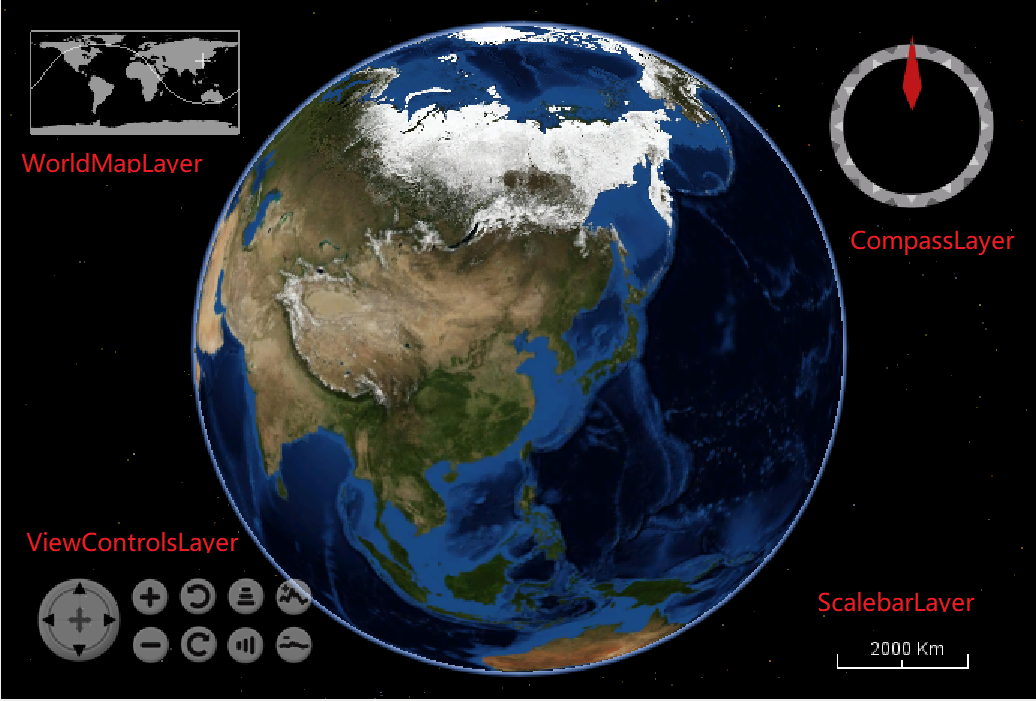 `WorldWindJava`中控件是以Layer图层的形式进行添加的。
在官方实例的`HelloWorldWind.java`中可以看到`WorldWindow`使用的是`BasicModel`对象:
```java
wwd.setModel(new BasicModel());
```
而在`BasicModel.java`中,优先查找`worldwind.xml`配置文件中的*gov.nasa.worldwind.avkey.LayerClassNames*
```java
public BasicModel()
{
String globeName = Configuration.getStringValue(AVKey.GLOBE_CLASS_NAME);
if (globeName == null)
return;
this.setGlobe((Globe) WorldWind.createComponent(globeName));
// Look for the old-style, property-based layer configuration first.
// If not found then use the new-style
// configuration.
LayerList layers = null;
String layerNames = Configuration.getStringValue(AVKey.LAYERS_CLASS_NAMES);
if (layerNames != null)
{
// Usage of this deprecated method is intentional.
// It provides backwards compatibility for deprecated functionality.
//noinspection deprecation
layers = this.createLayersFromProperties(layerNames);
}
else
{
Element el = Configuration.getElement("./LayerList");
if (el != null)
layers = this.createLayersFromElement(el);
}
// an empty list is ok
this.setLayers(layers != null ? layers : new LayerList(/*empty list*/));
}
```
但默认的`worldwind.xml`没有该属性,所以读取的是该文件下的`LayerList`节点:
```xml
...
```
`worldwind.layers.xml`中配置这默认的18个图层(包含默认的三个控件图层):
```xml
```
#### 重新指定配置文件
项目中可以通过设置Java系统属性的方式修改配置文件的路径,让系统读取自定义的配置。如:
1. 先将`worldwind.jar`包中的config目录中的Earth目录、worldwind.xml和worldwind.layers.xml拷贝到项目中
`WorldWindJava`中控件是以Layer图层的形式进行添加的。
在官方实例的`HelloWorldWind.java`中可以看到`WorldWindow`使用的是`BasicModel`对象:
```java
wwd.setModel(new BasicModel());
```
而在`BasicModel.java`中,优先查找`worldwind.xml`配置文件中的*gov.nasa.worldwind.avkey.LayerClassNames*
```java
public BasicModel()
{
String globeName = Configuration.getStringValue(AVKey.GLOBE_CLASS_NAME);
if (globeName == null)
return;
this.setGlobe((Globe) WorldWind.createComponent(globeName));
// Look for the old-style, property-based layer configuration first.
// If not found then use the new-style
// configuration.
LayerList layers = null;
String layerNames = Configuration.getStringValue(AVKey.LAYERS_CLASS_NAMES);
if (layerNames != null)
{
// Usage of this deprecated method is intentional.
// It provides backwards compatibility for deprecated functionality.
//noinspection deprecation
layers = this.createLayersFromProperties(layerNames);
}
else
{
Element el = Configuration.getElement("./LayerList");
if (el != null)
layers = this.createLayersFromElement(el);
}
// an empty list is ok
this.setLayers(layers != null ? layers : new LayerList(/*empty list*/));
}
```
但默认的`worldwind.xml`没有该属性,所以读取的是该文件下的`LayerList`节点:
```xml
...
```
`worldwind.layers.xml`中配置这默认的18个图层(包含默认的三个控件图层):
```xml
```
#### 重新指定配置文件
项目中可以通过设置Java系统属性的方式修改配置文件的路径,让系统读取自定义的配置。如:
1. 先将`worldwind.jar`包中的config目录中的Earth目录、worldwind.xml和worldwind.layers.xml拷贝到项目中
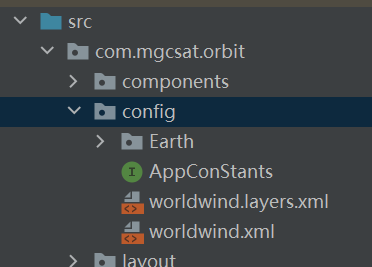 2. 修改worldwind.xml 中LayerList节点图层配置文件的路径:
```xml
```
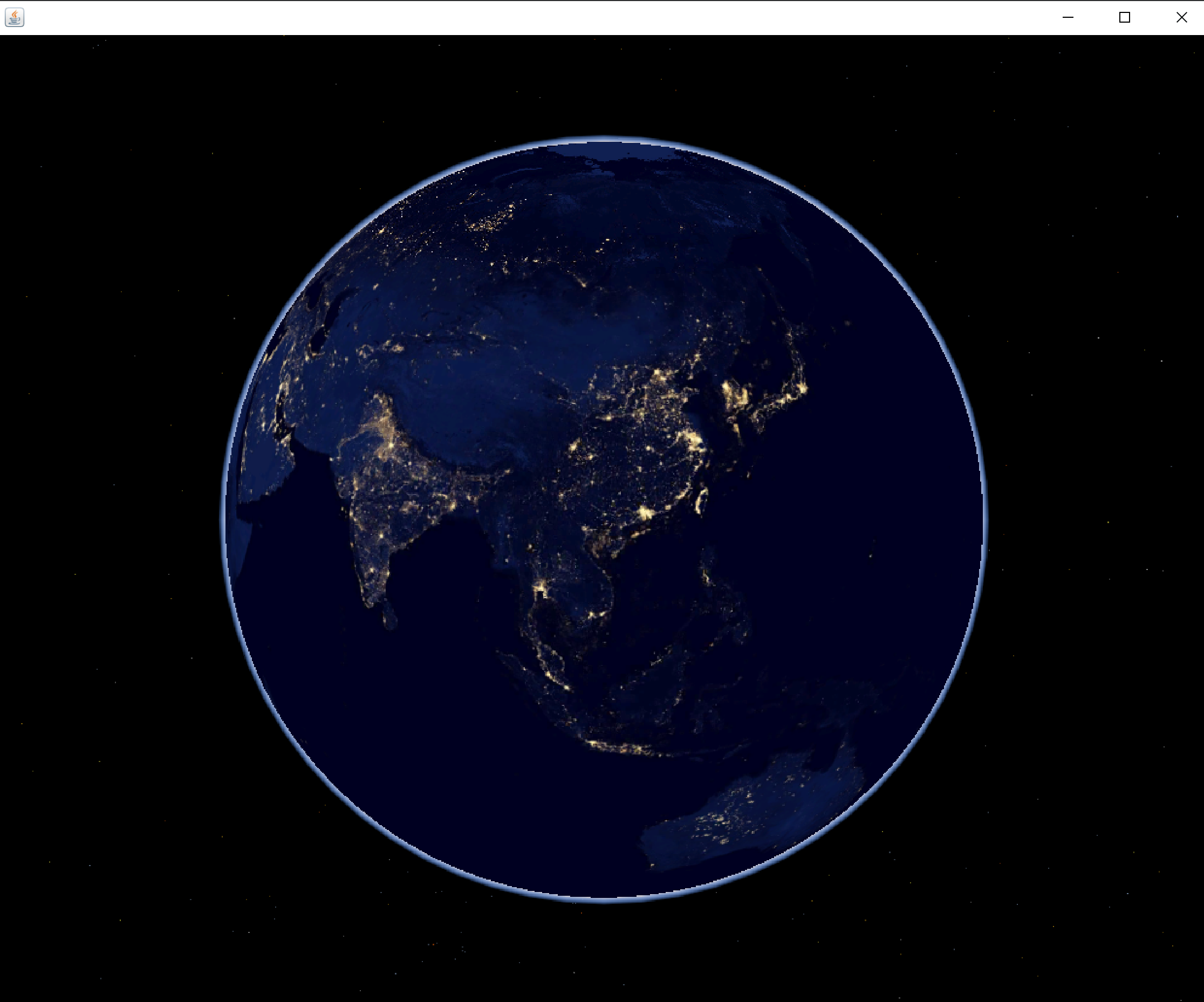
3. 修改图层配置文件worldwind.layers.xml。这里只加载星空、地球轮廓光晕、夜光三个图层。
```xml
```
4. 在项目的入口main方法里面指定配置文件路径:
```java
public class HelloWorldWind {
private static class AppFrame extends javax.swing.JFrame{
public AppFrame(){
WorldWindowGLJPanel wwd = new WorldWindowGLJPanel();
wwd.setPreferredSize(new java.awt.Dimension(1000, 800));
this.setDefaultCloseOperation(javax.swing.WindowConstants.EXIT_ON_CLOSE);
this.getContentPane().add(wwd, java.awt.BorderLayout.CENTER);
this.pack();
wwd.setModel(new BasicModel());
}
}
public static void main(String[] args){
//修改默认配置文件
System.setProperty("gov.nasa.worldwind.config.document", "com/mgcsat/orbit/config/worldwind.xml");
if (Configuration.isMacOS()){
System.setProperty("com.apple.mrj.application.apple.menu.about.name", "Hello WorldWind");
}
java.awt.EventQueue.invokeLater(new Runnable(){
public void run(){
new AppFrame().setVisible(true);
}
});
}
}
```
效果:
2. 修改worldwind.xml 中LayerList节点图层配置文件的路径:
```xml
```
3. 修改图层配置文件worldwind.layers.xml。这里只加载星空、地球轮廓光晕、夜光三个图层。
```xml
```
4. 在项目的入口main方法里面指定配置文件路径:
```java
public class HelloWorldWind {
private static class AppFrame extends javax.swing.JFrame{
public AppFrame(){
WorldWindowGLJPanel wwd = new WorldWindowGLJPanel();
wwd.setPreferredSize(new java.awt.Dimension(1000, 800));
this.setDefaultCloseOperation(javax.swing.WindowConstants.EXIT_ON_CLOSE);
this.getContentPane().add(wwd, java.awt.BorderLayout.CENTER);
this.pack();
wwd.setModel(new BasicModel());
}
}
public static void main(String[] args){
//修改默认配置文件
System.setProperty("gov.nasa.worldwind.config.document", "com/mgcsat/orbit/config/worldwind.xml");
if (Configuration.isMacOS()){
System.setProperty("com.apple.mrj.application.apple.menu.about.name", "Hello WorldWind");
}
java.awt.EventQueue.invokeLater(new Runnable(){
public void run(){
new AppFrame().setVisible(true);
}
});
}
}
```
效果:
 ---
#### ViewControllerLayer
在上述的例子中添加以下代码,添加ViewControllerLayer图层。
```java
//添加ViewController图层
ViewControlsLayer vc = new ViewControlsLayer();
wwd.getModel().getLayers().add(vc);
//将ViewController实例和worldwind关联,一个VC实例不能在多个worldwind中共享
ViewControlsSelectListener vcsl = new ViewControlsSelectListener(wwd, vc);
wwd.addSelectListener(vcsl);
```
---
#### ViewControllerLayer
在上述的例子中添加以下代码,添加ViewControllerLayer图层。
```java
//添加ViewController图层
ViewControlsLayer vc = new ViewControlsLayer();
wwd.getModel().getLayers().add(vc);
//将ViewController实例和worldwind关联,一个VC实例不能在多个worldwind中共享
ViewControlsSelectListener vcsl = new ViewControlsSelectListener(wwd, vc);
wwd.addSelectListener(vcsl);
```
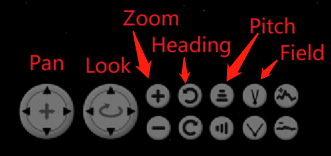
 完整的ViewControllerLayer功能提供Pan、Look、Zoom、Heading、Pitch、Field of view、View Elevation
 ```java
vc.setShowPanControls(true);
vc.setShowLookControls(true);
vc.setShowZoomControls(true);
vc.setShowHeadingControls(true);
vc.setShowPitchControls(true);
vc.setShowFovControls(true);//Field of view
vc.setShowVeControls(false);//View Elevation
```
常用方法:
```java
//1.设置vc在左下角的布局,有水平AVKey.HORIZONTAL和垂直两种AVKey.VERTICAL
vc.setLayout(AVKey.VERTICAL);
//2.设置vc整个大小比例
vc.setScale(0.8);
```
> 如果在应用中需要隐藏或显示已经绘制了的控件图层,如要隐藏ViewController中的Look,调用setShowLookControls(false)后,worldwind中控件还在,这需要worldwind实例调用redraw方法重新绘制。
---
#### WorldMapLayer
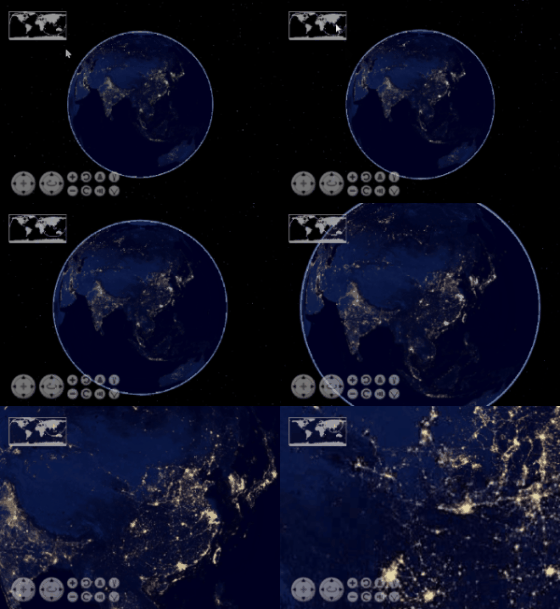
WorldMapLayer用于显示2D的地图,类似于WebGIS中的鹰眼效果一样。其中十字中心为View中心点所在位置,还有一条于View一起联动的视野范围的边界线。WorldMapLayer加入到WorldWindow中后,图层会随View一起联动,但点击WorldMapLayer图层,View是不会移动的,是单向的联动。
```java
vc.setShowPanControls(true);
vc.setShowLookControls(true);
vc.setShowZoomControls(true);
vc.setShowHeadingControls(true);
vc.setShowPitchControls(true);
vc.setShowFovControls(true);//Field of view
vc.setShowVeControls(false);//View Elevation
```
常用方法:
```java
//1.设置vc在左下角的布局,有水平AVKey.HORIZONTAL和垂直两种AVKey.VERTICAL
vc.setLayout(AVKey.VERTICAL);
//2.设置vc整个大小比例
vc.setScale(0.8);
```
> 如果在应用中需要隐藏或显示已经绘制了的控件图层,如要隐藏ViewController中的Look,调用setShowLookControls(false)后,worldwind中控件还在,这需要worldwind实例调用redraw方法重新绘制。
---
#### WorldMapLayer
WorldMapLayer用于显示2D的地图,类似于WebGIS中的鹰眼效果一样。其中十字中心为View中心点所在位置,还有一条于View一起联动的视野范围的边界线。WorldMapLayer加入到WorldWindow中后,图层会随View一起联动,但点击WorldMapLayer图层,View是不会移动的,是单向的联动。
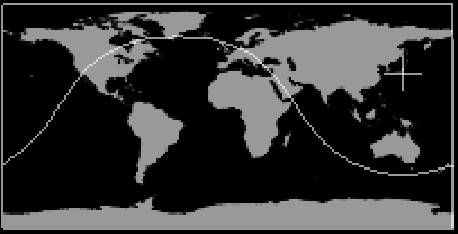 实现双向的联动可以使用`ClickAndGoSelectListener`类的实例,来监听和处理`WorldMapLayer`图层的点击事件。
```java
//创建WorldMapLayer
WorldMapLayer worldMapLayer = new WorldMapLayer();
wwd.getModel().getLayers().add(worldMapLayer);
//添加事件监听
wwd.addSelectListener(new ClickAndGoSelectListener(wwd, WorldMapLayer.class));
```
实现双向的联动可以使用`ClickAndGoSelectListener`类的实例,来监听和处理`WorldMapLayer`图层的点击事件。
```java
//创建WorldMapLayer
WorldMapLayer worldMapLayer = new WorldMapLayer();
wwd.getModel().getLayers().add(worldMapLayer);
//添加事件监听
wwd.addSelectListener(new ClickAndGoSelectListener(wwd, WorldMapLayer.class));
```
 常用方法:
```java
//设置图层所在位置,AVKey.NORTHEAST、AVKey.NORTHWEST(默认)、 AVKey.SOUTHEAST、SOUTHWEST.
worldMapLayer.setPosition(AVKey.NORTHEAST);
```
### 7. 绘制几何对象
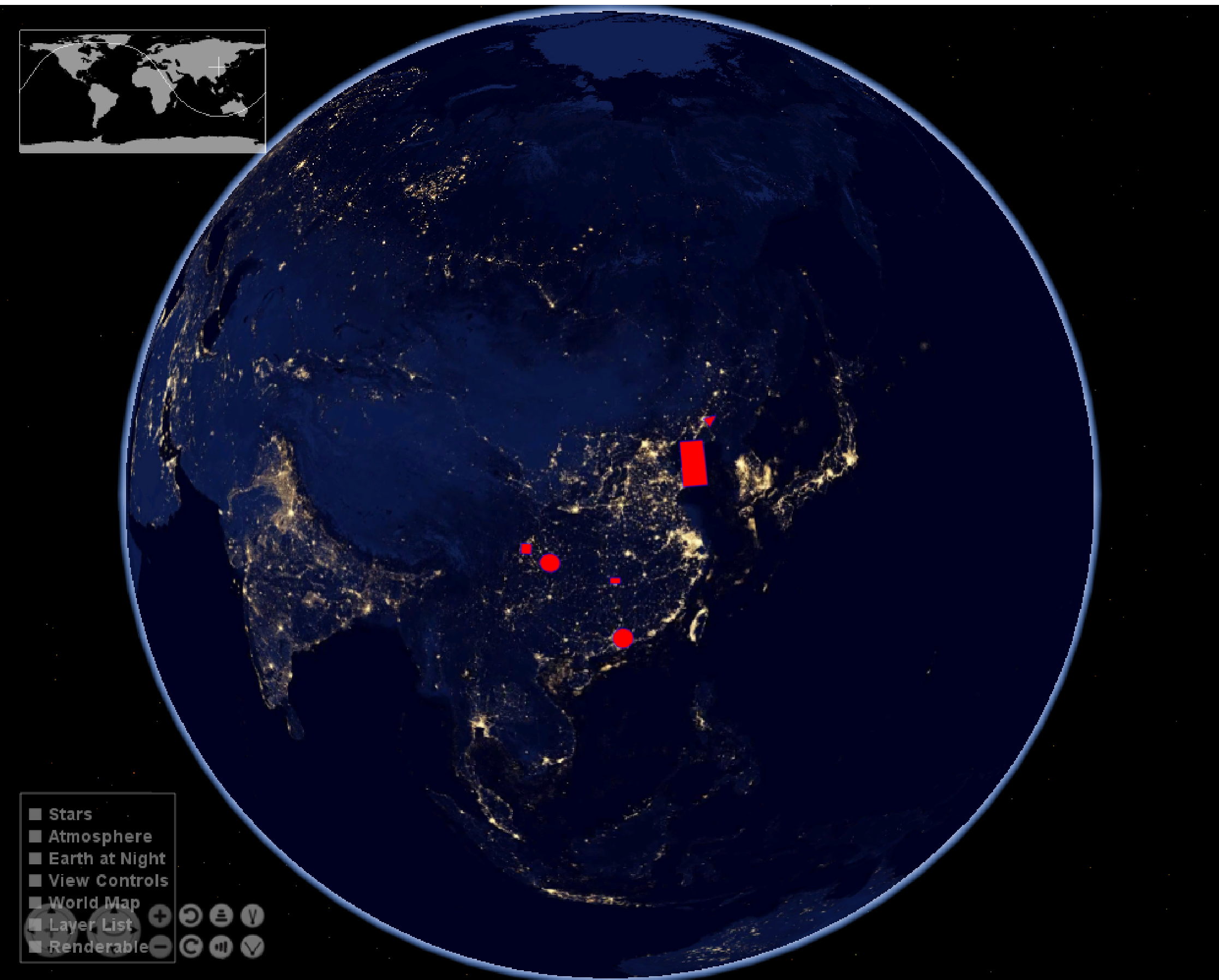
```java
//自定义图形图层
RenderableLayer layer = new RenderableLayer();
//将自定义图层,添加wwd中,因为没有配置地名图层所以不用担心遮挡问题
wwd.getModel().getLayers().add(layer);
//创建几何对象
LatLon dongguan = new LatLon(Angle.fromDegrees(23.04), Angle.fromDegrees(113.75));
LatLon chongqing = new LatLon(Angle.fromDegrees(29.59), Angle.fromDegrees(106.54));
LatLon chengdu = new LatLon(Angle.fromDegrees(30.67), Angle.fromDegrees(104.06));
LatLon wuhan = new LatLon(Angle.fromDegrees(30.52), Angle.fromDegrees(114.31));
LatLon changsha = new LatLon(Angle.fromDegrees(28.21), Angle.fromDegrees(113));
LatLon shenyang = new LatLon(Angle.fromDegrees(41.8), Angle.fromDegrees(123.38));
ArrayList surfaceLinePositions = new ArrayList<>();
surfaceLinePositions.add(shenyang);
surfaceLinePositions.add(LatLon.fromDegrees(42, 125));
surfaceLinePositions.add(LatLon.fromDegrees(41, 124));
surfaceLinePositions.add(shenyang);
SurfaceCircle circle = new SurfaceCircle(dongguan, 100e3);
SurfaceEllipse ellipse = new SurfaceEllipse(chongqing, 100e3, 90e3, Angle.ZERO);
SurfaceSquare square = new SurfaceSquare(chengdu, 100e3);
SurfaceQuad quad = new SurfaceQuad(changsha, 100e3, 60e3, Angle.ZERO);
SurfaceSector sector = new SurfaceSector(Sector.fromDegrees(36.07, 40, 120.33, 123));
SurfacePolygon polygon = new SurfacePolygon(surfaceLinePositions);
BasicShapeAttributes attr = new BasicShapeAttributes();
//设置图形边界
attr.setDrawOutline(true);
attr.setOutlineMaterial(new Material(new Color(0f,0f,1f)));
attr.setOutlineOpacity(1);
attr.setOutlineWidth(1);
//设置图形内部颜色(填充色)和不透明度
attr.setInteriorMaterial(new Material(new Color(1f,0f,0f,1)));
attr.setInteriorOpacity(1);
attr.setDrawInterior(true);
circle.setAttributes(attr);
layer.addRenderable(circle);
ellipse.setAttributes(attr);
layer.addRenderable(ellipse);
square.setAttributes(attr);
layer.addRenderable(square);
quad.setAttributes(attr);
layer.addRenderable(quad);
sector.setAttributes(attr);
layer.addRenderable(sector);
polygon.setAttributes(attr);
layer.addRenderable(polygon);
wwd.redraw();
```
常用方法:
```java
//设置图层所在位置,AVKey.NORTHEAST、AVKey.NORTHWEST(默认)、 AVKey.SOUTHEAST、SOUTHWEST.
worldMapLayer.setPosition(AVKey.NORTHEAST);
```
### 7. 绘制几何对象
```java
//自定义图形图层
RenderableLayer layer = new RenderableLayer();
//将自定义图层,添加wwd中,因为没有配置地名图层所以不用担心遮挡问题
wwd.getModel().getLayers().add(layer);
//创建几何对象
LatLon dongguan = new LatLon(Angle.fromDegrees(23.04), Angle.fromDegrees(113.75));
LatLon chongqing = new LatLon(Angle.fromDegrees(29.59), Angle.fromDegrees(106.54));
LatLon chengdu = new LatLon(Angle.fromDegrees(30.67), Angle.fromDegrees(104.06));
LatLon wuhan = new LatLon(Angle.fromDegrees(30.52), Angle.fromDegrees(114.31));
LatLon changsha = new LatLon(Angle.fromDegrees(28.21), Angle.fromDegrees(113));
LatLon shenyang = new LatLon(Angle.fromDegrees(41.8), Angle.fromDegrees(123.38));
ArrayList surfaceLinePositions = new ArrayList<>();
surfaceLinePositions.add(shenyang);
surfaceLinePositions.add(LatLon.fromDegrees(42, 125));
surfaceLinePositions.add(LatLon.fromDegrees(41, 124));
surfaceLinePositions.add(shenyang);
SurfaceCircle circle = new SurfaceCircle(dongguan, 100e3);
SurfaceEllipse ellipse = new SurfaceEllipse(chongqing, 100e3, 90e3, Angle.ZERO);
SurfaceSquare square = new SurfaceSquare(chengdu, 100e3);
SurfaceQuad quad = new SurfaceQuad(changsha, 100e3, 60e3, Angle.ZERO);
SurfaceSector sector = new SurfaceSector(Sector.fromDegrees(36.07, 40, 120.33, 123));
SurfacePolygon polygon = new SurfacePolygon(surfaceLinePositions);
BasicShapeAttributes attr = new BasicShapeAttributes();
//设置图形边界
attr.setDrawOutline(true);
attr.setOutlineMaterial(new Material(new Color(0f,0f,1f)));
attr.setOutlineOpacity(1);
attr.setOutlineWidth(1);
//设置图形内部颜色(填充色)和不透明度
attr.setInteriorMaterial(new Material(new Color(1f,0f,0f,1)));
attr.setInteriorOpacity(1);
attr.setDrawInterior(true);
circle.setAttributes(attr);
layer.addRenderable(circle);
ellipse.setAttributes(attr);
layer.addRenderable(ellipse);
square.setAttributes(attr);
layer.addRenderable(square);
quad.setAttributes(attr);
layer.addRenderable(quad);
sector.setAttributes(attr);
layer.addRenderable(sector);
polygon.setAttributes(attr);
layer.addRenderable(polygon);
wwd.redraw();
```
 ### 8. 数据检索
`WorldWind`处理大量的数据和信息,这些数据和信息主要存在于远程数据服务器上。`WorldWind`支持缓存远程请求的数据和信息,检索本地数据的功能。检索到远程数据后,它会存储在本地磁盘缓存中,然后从检索使用。缓存没有固定大小。可以通过应用程序以编程方式将其删除。
> 所有数据检索,甚至从磁盘检索,都在后台线程上执行。
### Tip:
---
**日期时间**:
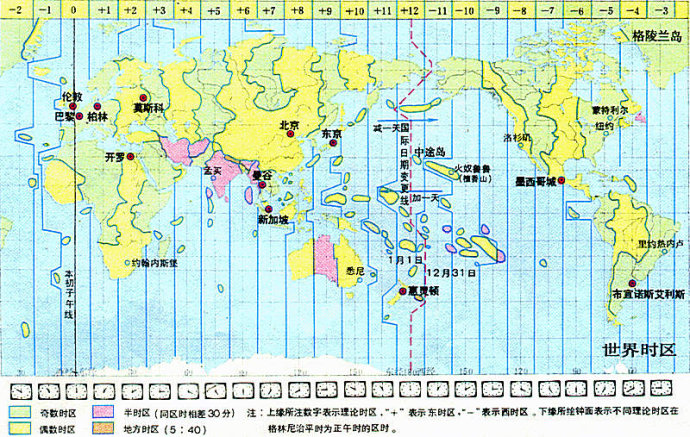
**儒略日**(Julian day,JD)是指由公元前4713年1月1日,协调世界时中午12时开始所经过的天数,多为天文学家采用,用以作为天文学的单一历法,把不同历法的年表统一起来。
[世界时](https://baike.baidu.com/item/世界时)[UT](https://baike.baidu.com/item/UT/4044923) 即[格林尼治](https://baike.baidu.com/item/格林尼治/3065623) 平太阳时间,是指格林尼治所在地的标准时间,也是表示地球自转速率的一种形式。
CST:中央标准时间,CST可视为美国、澳大利亚、古巴或中国的标准时间。
UTC:协调世界时即格林威治平太阳时间,是指格林威治所在地的标准时间,也是表示地球自转速率的一种形式,UTC基于国际原子时间。
GMT:被视为世界时UT, 即格林尼治平太阳时间,指格林尼治所在地的标准时间。GMT(Greenwish Mean Time 格林威治平时),这是UTC的民间名称。GMT=UTC。
### 8. 数据检索
`WorldWind`处理大量的数据和信息,这些数据和信息主要存在于远程数据服务器上。`WorldWind`支持缓存远程请求的数据和信息,检索本地数据的功能。检索到远程数据后,它会存储在本地磁盘缓存中,然后从检索使用。缓存没有固定大小。可以通过应用程序以编程方式将其删除。
> 所有数据检索,甚至从磁盘检索,都在后台线程上执行。
### Tip:
---
**日期时间**:
**儒略日**(Julian day,JD)是指由公元前4713年1月1日,协调世界时中午12时开始所经过的天数,多为天文学家采用,用以作为天文学的单一历法,把不同历法的年表统一起来。
[世界时](https://baike.baidu.com/item/世界时)[UT](https://baike.baidu.com/item/UT/4044923) 即[格林尼治](https://baike.baidu.com/item/格林尼治/3065623) 平太阳时间,是指格林尼治所在地的标准时间,也是表示地球自转速率的一种形式。
CST:中央标准时间,CST可视为美国、澳大利亚、古巴或中国的标准时间。
UTC:协调世界时即格林威治平太阳时间,是指格林威治所在地的标准时间,也是表示地球自转速率的一种形式,UTC基于国际原子时间。
GMT:被视为世界时UT, 即格林尼治平太阳时间,指格林尼治所在地的标准时间。GMT(Greenwish Mean Time 格林威治平时),这是UTC的民间名称。GMT=UTC。
